FreeRTOS+ WolfSSL Demo
An executable example
Download
The example presented on this page is available in the following directory
of the offical FreeRTOS zip file download:
FreeRTOS-Plus/Demo/FreeRTOS_Plus_WolfSSL_Windows_Simulator
Introduction
The project presented on this page demonstrates WolfSSL being used to
secure communication between a TCP/IP client and a TCP/IP server.
Hardware setup
The demo uses the
FreeRTOS Windows simulator.
The simulator provides an extremely convenient self contained evaluation environment
because it can be built using Microsoft's free Visual C++ Express
tools, and it removes the need to use any external hardware. However, unlike when
using a real FreeRTOS port, the FreeRTOS Windows simulator port does not
exhibit real time behaviour.
As the FreeRTOS simulator runs in a Windows environment, the demo application
also has access to, and therefore uses, the Windows TCP/IP stack and Windows
loopback virtual network interface. Using the loopback interface allows
the project to be used without a live network connection.
Although this demo application does not require any custom TCP/IP
functionality to be included in the build, it is generally very easy to
run WolfSSL on top of a popular (eg. lwIP) or custom TCP/IP stack, or
other transport medium (eg. Bluetooth). WolfSSL offers an easy-to-use
I/O abstraction layer
allowing the user to write their own custom Input/Output functions.
Provided the application is executed on a standard Windows computer,
no external hardware is necessary, and no hardware setup is necessary.
The TCP/IP server task
The FreeRTOS TCP/IP server task is implemented in the SecureTCPServerTask.c
source file.
It creates a TCP/IP socket that is configured to listen for connections from
the FreeRTOS TCP/IP client task. After accepting a connection, the TCP/IP
server task simply writes all the data it receives through the socket to the
console until the connection is closed.
A WolfSSL object is created each time a connection is accepted, and deleted
each time a connection is closed.
The server behaviour is depicted in the flowchart below.
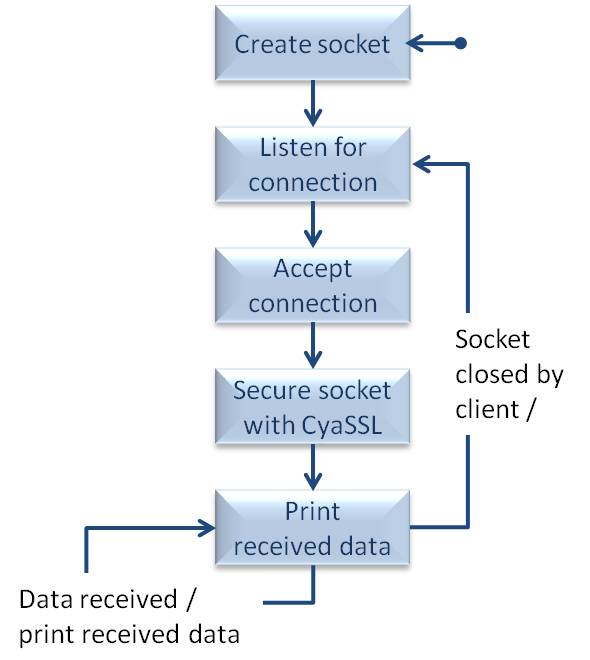
The behaviour of the RTOS server task
The TCP/IP client task
The FreeRTOS TCP/IP client task is implemented in the SecureTCPClientTask.c
source file.
It creates a TCP/IP socket, then repeatedly connects the socket to the FreeRTOS
TCP/IP server task, sends ten strings through the socket, before closing
the socket again. A short delay is used between each iteration to prevent
the server task writing to the console too quickly.
A WolfSSL object is created each time the socket is connected, and deleted
each time the socket is closed.
The client behaviour is depicted in the flow chart below.
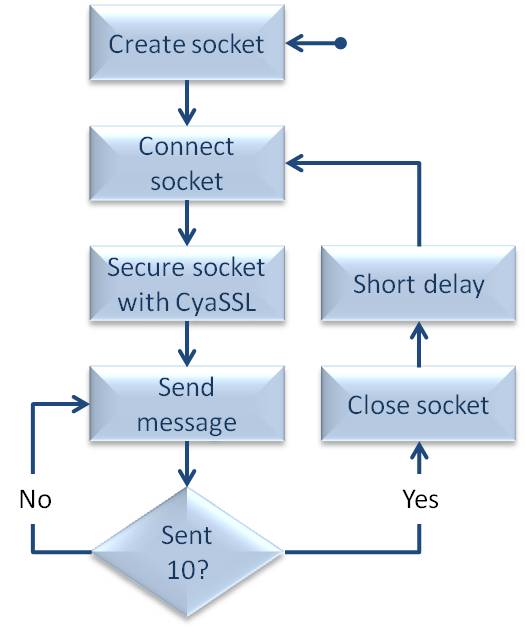
The behaviour of the RTOS client task
Building and executing the demo
-
Ensure Microsoft Visual C++ is installed.
The free Express version
can be used.
-
The Visual C++ solution file is called FreeRTOS_Plus_WolfSSL.sln, and is
located in the \FreeRTOS-Plus\Demo_Projects_Using_FreeRTOS_Simulator\FreeRTOS_Plus_WolfSSL
directory of the download. Double click the file to open Visual C++, or alternatively
open the file from within the Visual C++ IDE.
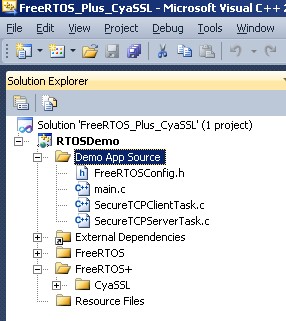
The RTOS project viewed in the Visual C++ IDE
Within the solution explorer:
-
The source files that implement the demo application are listed in the Demo App Source folder.
-
The source files that implement the encryption functionality are listed in the FreeRTOS+/WolfSSL folder.
-
The source files that implement the RTOS functionality are listed in the FreeRTOS folder.
-
Build and execute the application.
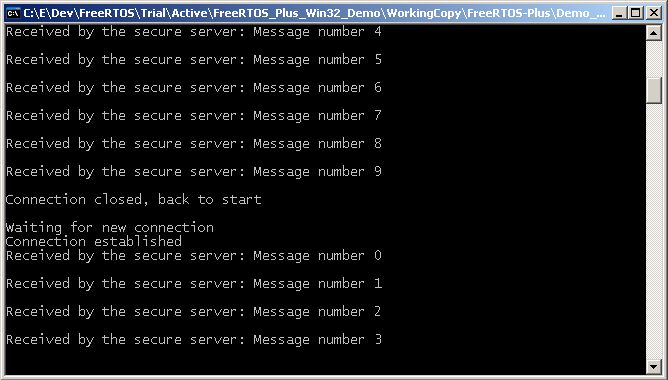
The output generated when the demo application executes