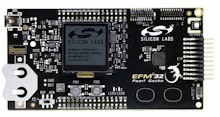
EFM32 Pearl Gecko Starter Kit SLSTK3401A
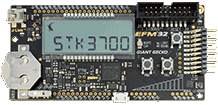
EFM32 Giant Gecko Starter Kit STK3700
EFM32 Giant Gecko Starter Kit STK3700
Two Simplicity Studio (GCC) projects are provided, one that is preconfigured to target the EFM32 Giant Gecko Starter Kit (STK3700), and one that is preconfigured to target the EFM32 Pearl Gecko Starter Kit (SLSTK3401A).
Both projects can be used to build either a comprehensive test and demo application, or a low power demo application that makes use of the FreeRTOS tick suppression capability (tickless idling). Three EFM32 specific tickless idle implementations are provided: an implementation that uses the RTC peripheral on the Giant Gecko, an implementation that uses the BURTC peripheral also on the Giant Gecko, and an implementation that uses the RTCC peripheral on the Pearl Gecko.
IMPORTANT! Notes on using the EFM32 RTOS demoPlease read all the following points before using this RTOS port.See also the FAQ My application does not run, what could be wrong? |
Source Code Organisation
The official FreeRTOS zip file download contains the source files for all the RTOS
ports, and all the demo applications, only a few of which are needed by the
EFM32 Gecko projects. See the Source Code Organization
section for a description of the downloaded files and information on creating a
new project.
The Simplicity Studio project for the Silicon Labs EFM32 Giant Gecko STK3700 demo application is located in the FreeRTOS/Demo/CORTEX_EFM32_Giant_Gecko_Simplicity_Studio directory.
The Simplicity Studio project for the Silicon Labs EFM32 Pearl Gecko SLSTK3401A demo application is located in the FreeRTOS/Demo/CORTEX_EFM32_Pearl_Gecko_Simplicity_Studio directory.
These are the directories that should be selected when importing the projects into a Simplicity Studio Eclipse workspace.
| EFM32 Giant Gecko Demo | |
| Setting | Project Built |
| 0 |
The comprehensive test and demo application will be built.
|
| 1 |
The simple low power tickless demo will be built with the following
parameters:
The tickless idle implementation that uses the BURTC peripheral is contained in the low_power_tick_management_BURTC.c source file. Note that using the ULFRCO clock has the benefit of very low power operation at the expense of accurate timing.
|
| 2 |
The simple low power tickless demo will be built with the following
parameters:
The tickless idle implementation that uses the RTC peripheral is contained in the low_power_tick_management_RTC.c source file. |
| EFM32 Pearl Gecko Demo | |
| Setting | Project Built |
| 0 |
The comprehensive test and demo application will be built.
|
| 1 |
The simple low power tickless demo will be built with the following
parameters:
The tickless idle implementation that uses the RTCC peripheral is contained in the low_power_tick_management_RTCC.c source file. |
main_full() creates a comprehensive test and demo application that demonstrates:
Most of the tasks created by the comprehensive demo are from the set of standard demo tasks. Standard demo tasks are used by all RTOS port demo applications. They have no specific functionality, and are created just to demonstrate how to use the FreeRTOS API, and test the RTOS port.
In addition to the standard demo tasks the comprehensive demo creates "RegTest" tasks, and a 'Check' task:
The two RegTest tasks fill all the CPU registers with unique values, then check that the values do not change throughout the lifetime of the task. A register containing an unexpected value is indicative of an error in the context switch mechanism (or a user error if the demo has been modified).
The check task is responsible for checking the RegTest and standard demo tasks are executing as expected, and indicating the system status by toggling an LED.
If the LED is toggling every 3 seconds, then the check task has not discovered any problems. If the LED is toggling every 200 milliseconds, then the check task has discovered a potential problem in at least one task.
main_low_power() creates a queue, a "queue send" task, and a "queue receive" task. It then starts the scheduler.
The queue send task sends the value 100 to the queue every second.
The queue receive task blocks on the queue, blipping (quickly turn on then off again) the LED each time it received the value 100 from the queue send task. The queue send task writes to the queue every second, so the LED will blip once a second.
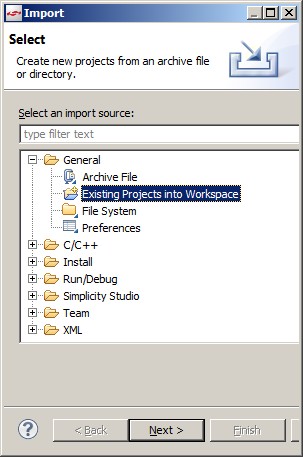
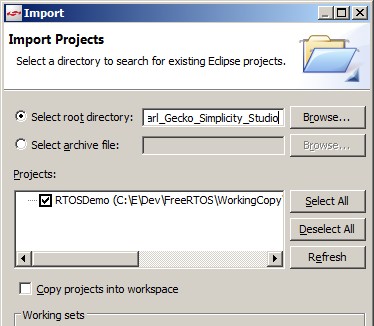
The project source files will appear in the Eclipse project explorer
window.
This sets the frequency of the RTOS tick interrupt. The setting used by this demo depends on the configCREATE_LOW_POWER_DEMO setting.
See the RTOS kernel configuration documentation for full information on these configuration constants.
Whereas configKERNEL_INTERRUPT_PRIORITY and configMAX_SYSCALL_INTERRUPT_PRIORITY are full eight bit shifted values, defined to be used as raw numbers directly in the ARM Cortex-M NVIC registers, configLIBRARY_LOWEST_INTERRUPT_PRIORITY and configLIBRARY_MAX_SYSCALL_INTERRUPT_PRIORITY are equivalents that are defined using just the 3 priority bits implemented in the EFM32 NVIC. These values are provided because the CMSIS library function NVIC_SetPriority() requires the un-shifted 3 bit format.
Attention please!: See the page dedicated to setting interrupt priorities on ARM Cortex-M devices. Remember that ARM Cortex-M cores use numerically low priority numbers to represent HIGH priority interrupts. This can seem counter-intuitive and is easy to forget! If you wish to assign an interrupt a low priority do NOT assign it a priority of 0 (or other low numeric value) as this will result in the interrupt actually having the highest priority in the system - and therefore potentially make your system crash if this priority is above configMAX_SYSCALL_INTERRUPT_PRIORITY. Also, do not leave interrupt priorities unassigned, as by default they will have a priority of 0 and therefore the highest priority possible.
The lowest priority on a ARM Cortex-M core is in fact 255 - however different ARM Cortex-M microcontroller manufacturers implement a different number of priority bits and supply library functions that expect priorities to be specified in different ways. For example, on Silicon Labs ARM Cortex-M microcontrollers, the lowest priority you can specify is in fact 7 - this is defined by the constant configLIBRARY_LOWEST_INTERRUPT_PRIORITY in FreeRTOSConfig.h. The highest priority that can be assigned is always zero.
Each port #defines 'BaseType_t' to equal the most efficient data type for that processor. This port defines BaseType_t to be of type long.
Note that portYIELD_FROM_ISR() will leave interrupts enabled.
The following source code snippet is provided as an example. The interrupt uses a direct to task notification to synchronise with a task (not shown), and calls portYIELD_FROM_ISR() to ensure the interrupt returns directly to the task if the task has an equal or higher priority than the interrupted task.
void Dummy_IRQHandler(void)
{
long lHigherPriorityTaskWoken = pdFALSE;

    /* Clear the interrupt if necessary. */
    Dummy_ClearITPendingBit();

    /* This interrupt does nothing more than demonstrate how to synchronise a
    task with an interrupt.  A direct to task notification is used for this purpose.
    Note lHigherPriorityTaskWoken is initialised to zero. */
    vTaskNotifyGiveFromISR( xTaskHandle, &lHigherPriorityTaskWoken );

    /* If the task referenced by the xTaskHandle handle was in the Blocked state
    waiting for a notification then calling vTaskNotifyGiveFromISR() will have
    moved the task into the Ready state.  If the task was moved into the Ready
    state, and the task's priority is higher than the priority of the currently
    executing task (the task this interrupt interrupted), then
    lHigherPriorityTaskWoken will have been set to pdTRUE internally within
    vTaskNotifyFromISR().  Passing pdTRUE into the portYIELD_FROM_ISR() macro
    will result in a context switch being pended to ensure this interrupt returns
    directly to the unblocked, higher priority, task.  Passing pdFALSE into
    portYIELD_FROM_ISR() has no effect. */
    portYIELD_FROM_ISR( lHigherPriorityTaskWoken );
}
Only FreeRTOS API functions that end in "FromISR" can be called from an interrupt service routine - and then only if the priority of the interrupt is less than or equal to that set by the configMAX_SYSCALL_INTERRUPT_PRIORITY configuration constant (or configLIBRARY_MAX_SYSCALL_INTERRUPT_PRIORITY).
When configCREATE_LOW_POWER_DEMO is set to 1 exclusive access to the RTC, RTCC or BURTC peripheral is required - depending on the configuration.